
Set up Finance notifications for a facility
Each facility decides who hears about its Finance projects and when project managers get reminders. These notifications only go to Admins and Managers with access to the facility, never to Technicians, Tenants or Viewers. Nobody gets notified about a change they made themselves.
Who can do this: Admin, Manager
-
Select Facilities in the sidebar.
-
Select the three-dot menu on the facility’s card, then Notifications.
-
Select the Finance tab.
-
Change the settings described below.
-
Select Save Settings.
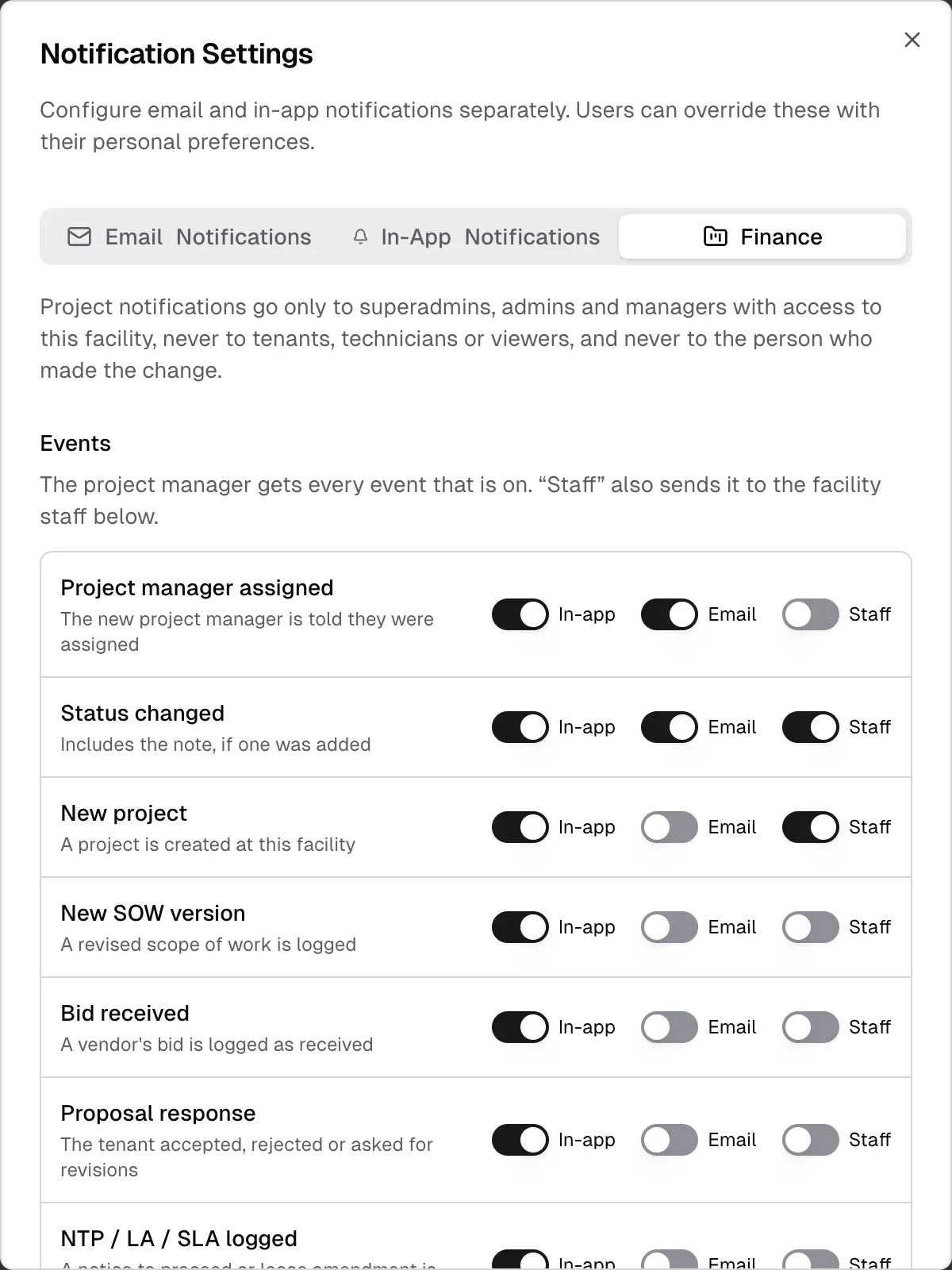
Events
Section titled “Events”Each event has three switches. In-app and Email turn that kind of notification on. Staff also sends the event to the facility staff you choose under Recipients. You can’t turn on Staff while In-app and Email are both off.
| Event | When it’s sent | On by default |
|---|---|---|
| Project manager assigned | Someone is made project manager | In-app, Email |
| Status changed | A project’s status changes, with the note if one was added | In-app, Email, Staff |
| New project | A project is created at this facility | In-app, Staff |
| New SOW version | A revised scope of work is logged | In-app |
| Bid received | A vendor’s bid is logged as received | In-app |
| Proposal response | The tenant accepted, rejected or asked for revisions | In-app |
| NTP / LA / SLA logged | A notice to proceed or lease amendment is logged | In-app |
Recipients
Section titled “Recipients”Project manager is on by default. The project’s manager gets every event that’s on.
Facility staff is who gets the events marked Staff:
- All admins and All managers are on by default. They cover Admins and Managers with access to this facility.
- Specific staff members adds individual people. Select the user icon, tick the people you want, then select Done. The list shows the Admins and Managers assigned to this facility.
Reminder emails
Section titled “Reminder emails”Reminder emails is on by default. It sends each project manager one email listing their projects that are past the target date or haven’t changed status for too long, plus any service agreements they own that are missing a bill. Nothing is sent when there’s nothing to report.
- How often is Daily, 9 AM or Weekly, Monday 9 AM. Times are Eastern.
- Stalled after (days) is how many days a project can go without a status change before it counts as stalled. Enter a whole number from 1 to 365. The default is 30. The same number decides which projects show as stalled on the Finance overview.
Closed and cancelled projects aren’t included. A project at Work Complete isn’t reported as past its target date, but it can still show as stalled. Disabled facilities don’t send reminders.
How this fits with personal settings
Section titled “How this fits with personal settings”These settings decide who can get a notification. Each person can still turn off Assigned to Me, Project Activity and Reminders for themselves. See Notifications.