
Switch between facilities
If you work at more than one location, the facility switcher sets which one you’re looking at. It sits at the top of the sidebar and shows your current facility’s name.
-
Select the facility name at the top of the sidebar. On a phone, open the sidebar first.
-
Select a facility from the list.
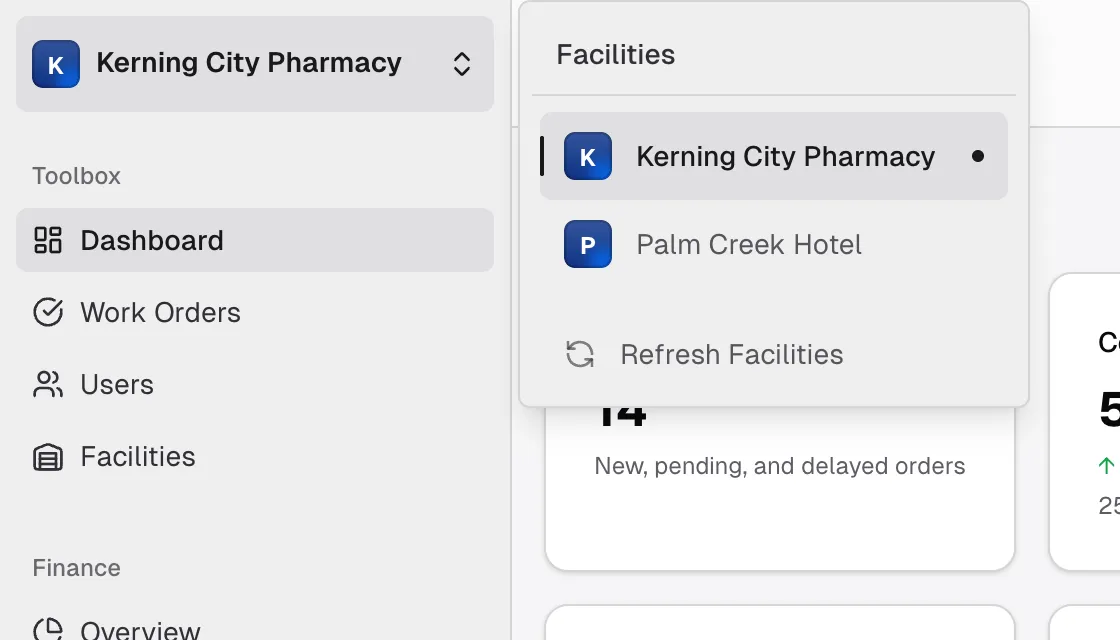
Flex CMMS remembers your choice in this browser.
What the switcher changes
Section titled “What the switcher changes”The Dashboard and Work Orders pages show only the selected facility, and new work orders are created there.
The Facilities page always lists all your facilities. Finance pages also cover all your facilities and have their own facility filter, so the switcher doesn’t narrow them.
Refresh your list of facilities
Section titled “Refresh your list of facilities”Your list doesn’t always update on its own. If a facility was just added or renamed, or you were just assigned to one, select Refresh Facilities at the bottom of the switcher. Reloading the page does the same thing.
A disabled facility
Section titled “A disabled facility”A facility that has been disabled still appears in the list, dimmed and with a Disabled label. You can select it and view its work orders, but you can’t change them. See Disable or enable a facility.
If you have no facilities
Section titled “If you have no facilities”If the switcher says No facilities are assigned to you, and the Work Orders page says No Facilities Available, you haven’t been given access to a facility yet. Ask your Admin to assign you to one.