
Track vendor invoices
An invoice is any bill a vendor sends, whether it’s for a project, a recurring service or a repair. Use the Invoices page to see what you owe and what’s overdue. Flex CMMS keeps the record of what you paid, but it doesn’t send money.
Who can do this: Admin, Manager
In the sidebar under Finance, select Invoices.
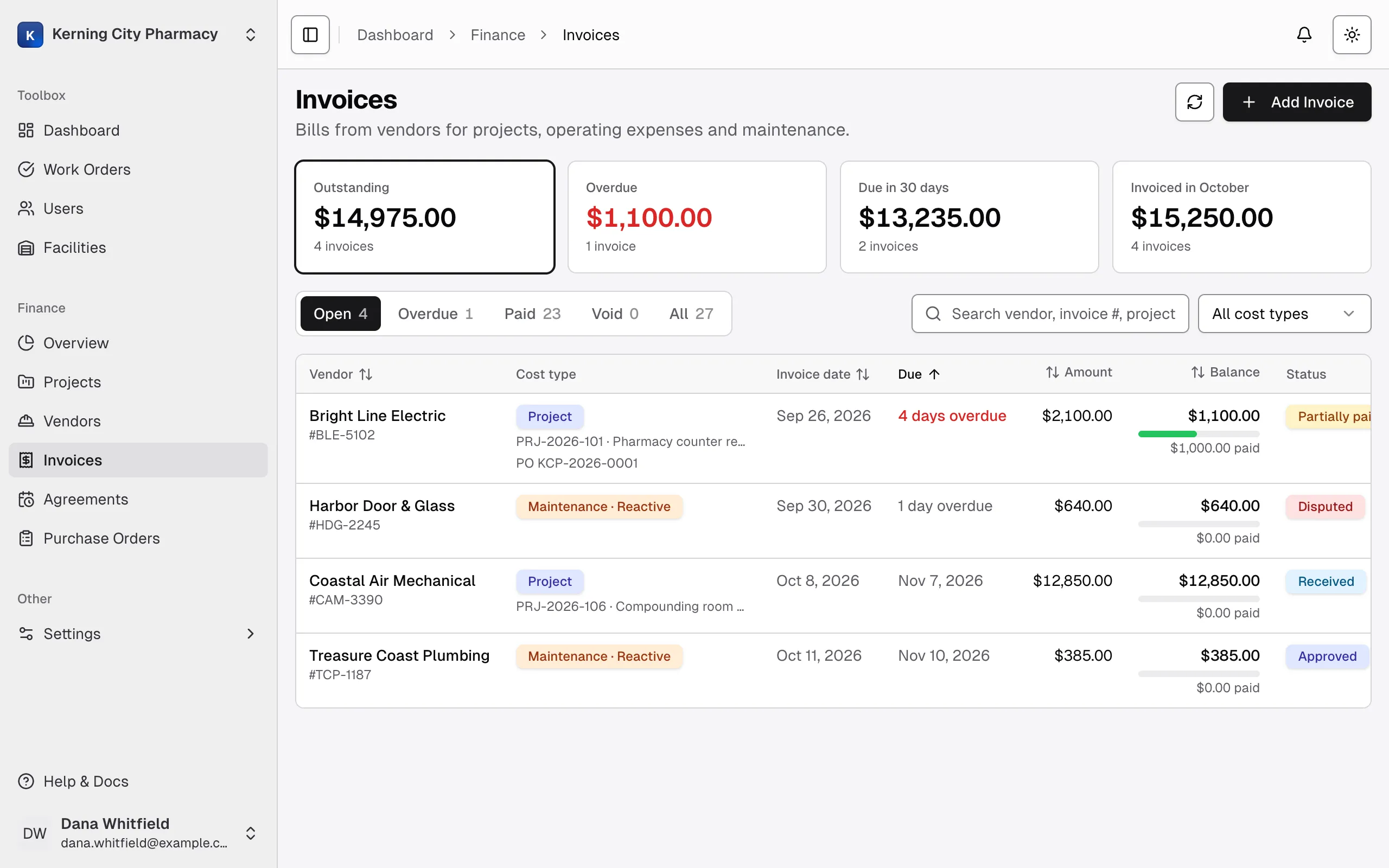
Summary cards
Section titled “Summary cards”| Card | What it shows |
|---|---|
| Outstanding | The balance due on open invoices |
| Overdue | The balance due on invoices past their due date, not counting disputed ones |
| Due in 30 days | The balance due on open invoices due from today through the next 30 days, including disputed ones |
| Invoiced in the current month, such as Invoiced in October | The total billed this month, not counting void invoices |
Select Outstanding, Overdue or Due in 30 days to filter the list. Search and filters narrow the cards too, so they always add up what you’re looking at.
Tabs and filters
Section titled “Tabs and filters”| Tab | What it lists |
|---|---|
| Open | Invoices with money still owed |
| Overdue | Open invoices past their due date, not counting disputed ones |
| Paid | Invoices paid in full |
| Void | Invoices cancelled by an Admin |
| All | Everything |
Search by vendor, invoice number, description, project or work order number. You can also filter by cost type, and by facility if your invoices cover more than one. Select a column heading to sort the table. On a phone, each invoice is a card.
The Due column counts down as the date gets close, with labels like Due in 3 days, Due today and 4 days overdue.
Invoice statuses
Section titled “Invoice statuses”Two things decide the status you see: how far along the review is, which you set, and how much has been paid, which Flex CMMS works out.
| Status | What it means |
|---|---|
| Received | The bill is in and hasn’t been reviewed |
| Approved | You’ve reviewed it |
| Disputed | You’re questioning the bill. It stays in Outstanding, but it isn’t counted as overdue. |
| Partially paid | Some of it has been paid |
| Paid | It’s paid in full |
| Void | An Admin cancelled it. It stays on record but doesn’t count in any total. |
You can’t set Paid or Partially paid by hand. They come from the payments you record. If an invoice is both disputed and partly paid, it shows Disputed.
An invoice with no due date never shows as overdue, so enter one whenever the vendor gives you a date.
Open an invoice
Section titled “Open an invoice”Select a row to open the invoice. Its payments and attachments come first, then the editable details.
You can also find a project’s invoices on its Invoices tab, and a purchase order’s on its page. A service agreement’s bills are in its billing periods.