
Track tenant projects
A project tracks work a tenant asks for, from the first Scope of Work to closeout. Use the Projects page to see where every job stands and what’s waiting on you.
Who can do this: Admin, Manager
Vendors and lessee staff don’t use Finance, so you log what they send you. Projects use a few lease terms:
- SOW (Scope of Work): what the tenant wants done.
- Bid: a vendor’s price for the work.
- Proposal: your price to the tenant.
- NTP, LA and SLA: the Notice to Proceed, Lease Amendment or Supplemental Lease Agreement that authorizes the work and the amount.
Find a project
Section titled “Find a project”In the sidebar under Finance, select Projects. The page opens on the board. Use the Table and Board switch at the top to change views, and Flex CMMS remembers your choice in this browser.
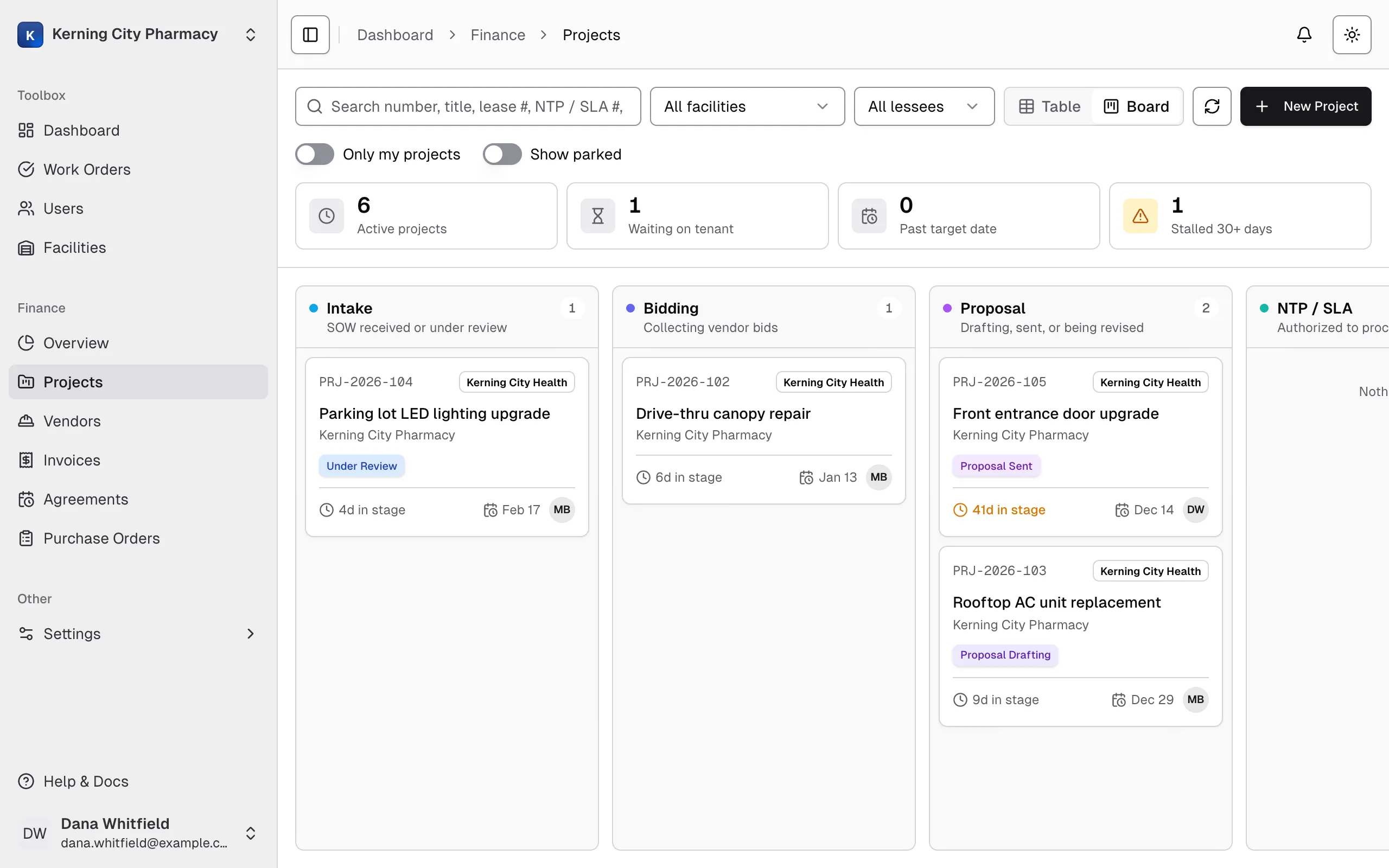
Each column groups related statuses: Intake, Bidding, Proposal, NTP / SLA, In Progress and Closed. Turn on Show parked to add a Parked column for projects that are On Hold, Proposal Rejected or Cancelled.
Each card shows the project number, title, facility, how long it’s been in this stage, the target date and the project manager’s initials. Auth. is the authorized amount, and Prop. is the latest proposal if nothing is authorized yet. A red edge means the project is past its target date.
The four tiles at the top double as filters. Select one to narrow the board, and select it again to clear it.
| Tile | What it shows |
|---|---|
| Active projects | Everything except Closed and parked projects |
| Waiting on tenant | Projects at Proposal Sent |
| Past target date | Projects past their target that aren’t Work Complete, Closed or Cancelled |
| Stalled 30+ days | Active projects with no status change in 30 days or more |
You can also search by number, title, lease number, NTP or SLA number, facility or contact name, filter by facility or lessee, and turn on Only my projects. The board remembers these filters in this browser.
Select a card to open the project. To move a card to another stage, see Change a project’s status.
The table has one row per project, with its status, facility, lessee, project manager, proposal and authorized amounts, target date and last activity. Rows past their target date are tinted red.
Select Show Controls to filter by status, lessee, facility, project manager, title, lease number, NTP or SLA number, or date. On a phone, use the filter button instead. Select a row to open the project.
What’s on a project page
Section titled “What’s on a project page”The top of the page shows the project number, status and a Past target date badge if it applies. The tracker below it shows which stage the project has reached. A stage turns amber if the project is On Hold, Proposal Rejected or Cancelled.
| Tab | What’s there |
|---|---|
| Overview | The latest proposal, the authorized amount, project details, lessee and lease details, and the description |
| SOW | Each version of the Scope of Work |
| Bids | Vendor bids and a comparison of their prices |
| Proposal | Each proposal you sent and the tenant’s response |
| NTP / SLA | The documents that authorize the work |
| Invoices | Vendor bills on this project, with Invoiced, Paid and Balance due totals |
| Correspondence | Emails and other communication you’ve logged |
| Activity | Who did what and when, including status changes, invoices, payments and purchase orders |